K3s: A lightweight Kubernetes

Introduction
K3s is a lightweight Kubernetes distribution that is designed to be easy to install and use. It is a great way to run a Kubernetes cluster in a home lab.
In this documentation, I assume you're running a Linux server on Debian.
Requirements
You can find a list of requirements on the K3s website. Basically the most important thing is to disable the firewall system to not overlap with the k3s network.
Installation
To install k3s on multiple nodes, its is preferable to use a configuration management tool like Ansible.
Here we'll see how to install k3s on a single node manually for simplicity. K3s has 2 roles:
- Server (K3s Control plane)
- Agent (K3s client/workers)
On large cluster, you generally have 3 (or more) dedicated nodes for the control plane and the rest for the workers. But here we'll keep it simple and run the control plane and the worker on the same node.
Start by creating a file to configure the kubelet:
Then run this command with root privileges:
etcd-expose-metricsis used to expose the etcd metrics to the Prometheus server.flannel-backend=noneis used to disable the flannel network plugin because I prefer using Cilium for the network policy.disable-network-policyrequired by Cilium.disable=traefikyou can keep it, but I prefer letting Qovery handle the ingress with Nginx.disable=metrics-serversame here, I prefer using Qovery for the metrics.disable servicelbwe'll use metallb for the load balancer.bind-address=0.0.0.0is used to bind the kubelet to all interfaces.
Graceful shutdown
I personaly don't like how k3s shutdown the server when a reboot is triggered. It's not graceful and dangerous if you're hosting stateful apps likes databases.
To gracefully shutdown the k3s server, you can use this script:
Then create a systemd service to run it on reboot/shutdown:
Finally set execution permissions and enable the service:
You can now reboot the server and see that pods are gracefully shutdown:
TLS SAN
You can add additional SAN to the k3s certificate with the following configuration:
This will help you to get the certificate working with your local domain and external domain. It starts to be useful when you want to use a load balancer in front of your API cluster, so redirection to any API server will be valid.
Load balanced Kubernetes API
To get the API load balancing working, you can use metallb or Cilium L2 Advertisment. We'll see here how to do it with Cilium L2 (it's just the annotation changing).
By default Kubernetes provides a kubernetes service in the default namespace with endpoints resources generated Kubernetes itself. Unfortunately we can't use this service to get the API load balancing working. We have to create our own endpoints.
Here we're going to use Helm to simplify the process and generate endpoints based on the original kubernetes service:
Update the lbipam.cilium.io/ips annotation with the IP you want to use for the load balancer. Then when you deploy it, Cilium will create a load balancer with the IP you specified and the endpoints will be the same as the original kubernetes service.
Then update your kubeconfig to use the load balancer IP with the load balanced IP you've selected above:
Worker node behind Wireguard
If you connect some remote node with Wireguard, you will certainly face to Prometheus error KubeAggregatedAPIDown and K3s/etcd Raft logs error dropped internal Raft message since sending buffer is full.
What is Raft?
Raft is a consensus algorithm used by distributed systems to maintain consistency across multiple nodes. On Kubernetes, etcd uses Raft to maintain consistency across multiple nodes.
This is due to the fact that the default MTU of the Wireguard interface (wg0) is around 1360 bytes, which is smaller than the default MTU of the underlying network interface, like Cilium CNI. Your CNI may have an MTU autodetect mechanism, but it's not bullet proof. This causes the Raft messages to be fragmented, which in turn causes the Raft protocol to fail.
If you're running in an enterprise environment, enabling Jumbo Frames and raise the wireguard MTU around 8940, and network card to 9000 could solve the issue.
In a case you have to deal with most of the internet network (like home labs for example), you'll have to deal with the legacy MTU, set to 1500 and we have to lower our own MTU.
First you need ensure that the Wireguard MTU is lower than the network interface. In your Wireguard config, set the MTU on the Wireguard interface and enable TCP MSS Clamping to avoid fragmentation:
Then, we'll update the MTU of the CNI. If you're using Cilium with its helm chart, simply add this to your configuration (warning: VXLAN overhead +50 bytes):
To make it clear, here is global picture:
flowchart TD
    Pod["Pod Payload / Raft Message"]

    subgraph cni_layer ["CNI Layer"]
        CNI["Cilium Interface<br/>MTU: 1280 bytes"]
    end

    subgraph vpn_layer ["VPN Layer"]
        WG["Wireguard Interface (wg0)<br/>MTU: 1360 bytes"]
    end

    subgraph physical_layer ["Physical Layer"]
        ETH["Physical Interface (eth0)<br/>MTU: 1500 bytes"]
    end

    subgraph internet_layer ["Internet Layer"]
        INT["Internet Legacy<br/>MTU: 1500 bytes"]
    end

    Pod --> cni_layer
    cni_layer -->|"Encapsulated"| vpn_layer
    vpn_layer -->|"Encapsulated"| physical_layer
    physical_layer -->|"Sent over"| internet_layer
Finally, restart your k3s and wireguard service:
|
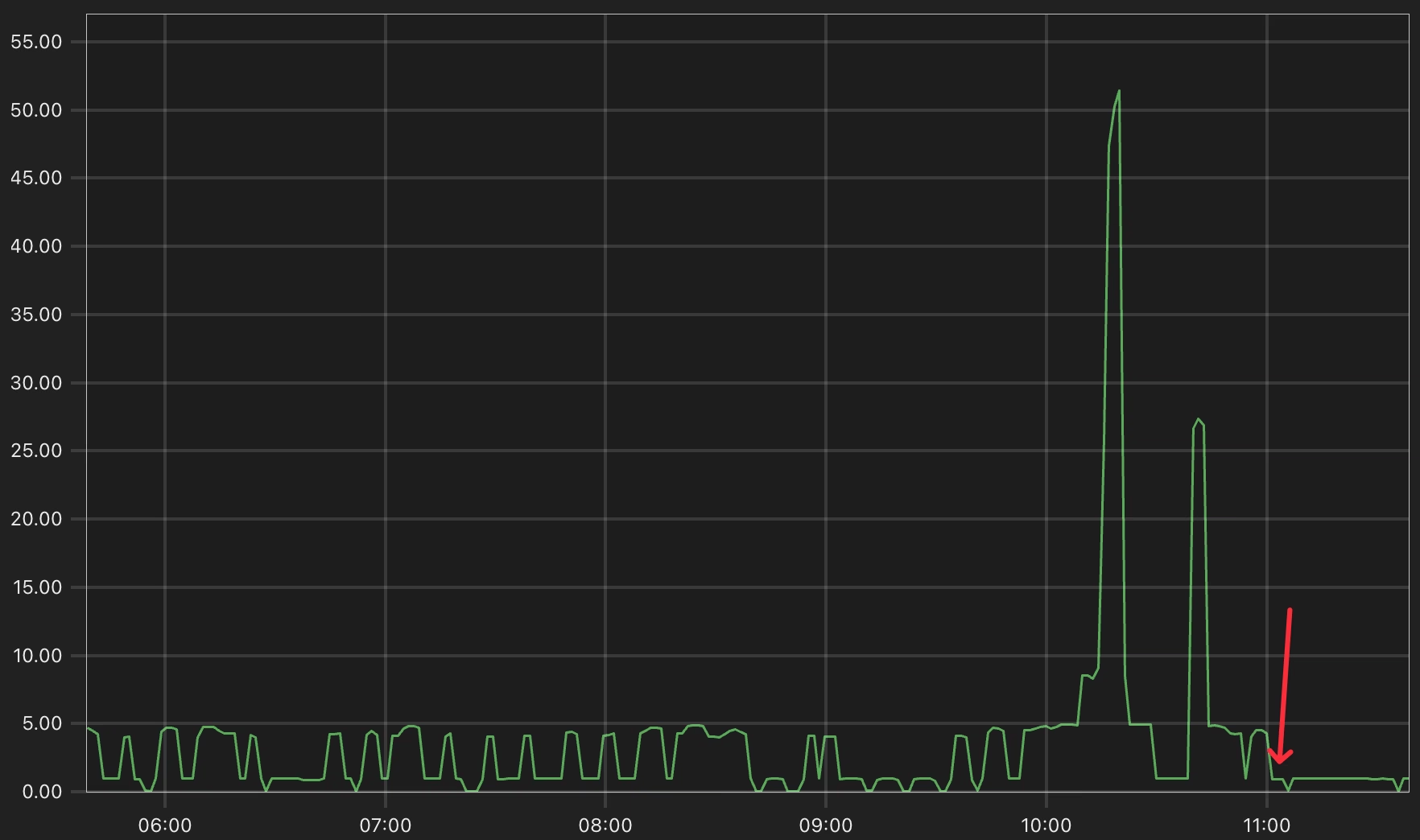
If you observe Etcd logs through Prometheus, you should see a better result with this query: